Apollo Workplace
Pre-release screen shots
Questions?
Application Gripper
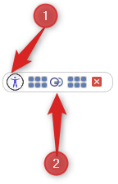
This is the small bar that shows at the top of the screen and stays on top of all other windows including other applications.
- Click to show the accessibility panel and change key accessibility options.
- Show / Hide the main application ribbon for key features.
Accessibility Panel
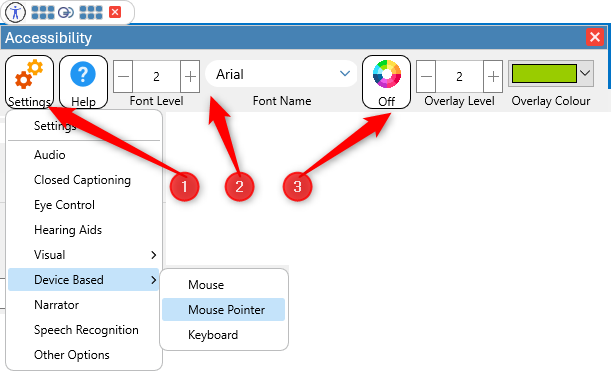
This panel provides access to main accessibility functions. Appropriate MS-Windows settings can be quickly accessed from here.
- For the inbuilt application browser (Microsoft Edge Embedded) the size of font and
- the font-face can be changed from a supported list.
- A colour overlay can be turned on/off along with the level of transparency and colour applied.
Application Ribbon Bar
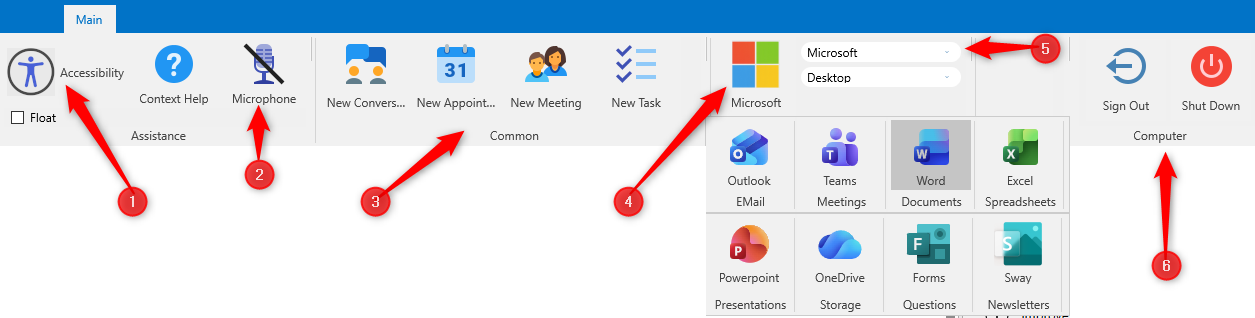
Main bar providing access to Apollo features and additional 3rd party tools.
- Additional button for the accessibility panel.
- Microphone Status On/Off
- Create New Conversations, Appointments and Meetings.
- Access to some of the currently selected suppliers tools.
- Switch between Microsoft, Google and Apple tools.
- Sign out or shut down your computer (After confirmation of course).